Computer Build 09: Part 11

With the hardware side of my build nearing the end, I’ve been working on system tweaking and overclocking. The new I7 platform has a lot of new overclocking facets to it over the AMD architecture that I was used to. I7 overclocking revolves around the base clock frequency (Bclock) a pretty close analog to the Front-Side Bus speed of the old days. Changing the Bclock affects the speed of the CPU, the L3 cache, the on-chip memory controller, and the RAM and each one of those is further tailored by a multiplier. Another new player is the Quick Path Interconnect (QPI) which is like the HyperTransport that AMD has had for years – in lieu of a Front-Side Bus, the QPI connects the CPU to the motherboard chipset. Generally the QPI has plenty of bandwidth so you can keep it scaled back a bit as you crank up the CPU and memory. And of course with overclocking comes voltage tweaks to feed the power that’s necessary.

The bios on my new machine gives access to tweak all these thing and is laid out very well. It also supports storing overclock settings to different profiles to make it easy to switch around and compare. Here’s the screen that deals will the clocks and multipliers (with the default settings). Besides this there is another screen for changing voltages and another for RAM timings.

In my first tweak session, I initially pushed things too fast without the necessary bump in voltage and it wouldn’t post. After edging some voltages up (Vcore and VTT) and the speed (Bclock) back down I starting having more success. After several more trials over a couple weeks I got things dialed in pretty well, while not raising the voltages (and the temps) too far. Currently I’ve raised the CPU up around 43% to 3.8GHz. That’s over a full gHz over the stock speed (for free!) so I’m pretty pleased. I have speed stepping still on so it doesn’t run at that speed full-time, though. I also have Intel’s Turbo feature enabled which means at times one core may jump up to about 4Ghz!

Param Default OC increase
CPU (GHz) 2.66 3.8 43%
Bclock (Mhz) 133 190 43%
Vcore 1.17 1.31 +140mV
VTT 1.15 1.29 +140mV
VIOH 1.10 1.22 +120mV
QPI (MHz) 2400 3425 43%
DDR3 1066 1524 (7 7 7 16 1T) 43%
CPU Temp (typ C) 32 44 +12
Mobo NB (IOH) Temp (typ C) 39 42 +3
Mobo SB (ICH) Temp (typ C) 28 30 +2

I also cranked the graphics card up just a bit. My GTX260 is already EVGA’s factory overclocked model, so I didn’t want to push it too much further, but with decent cooling in my case I knew I could get by with a little.

Param Default OC increase
Core 626 675 8% (17% over standard gtx260)
Shader 1349 1455 8%
Memory 2106 2400 14%
GPU Temp (idle/max C) 37/65 40/70 +3/+5

Filed under Comp hardware / mods

Computer Build 09: Part 10

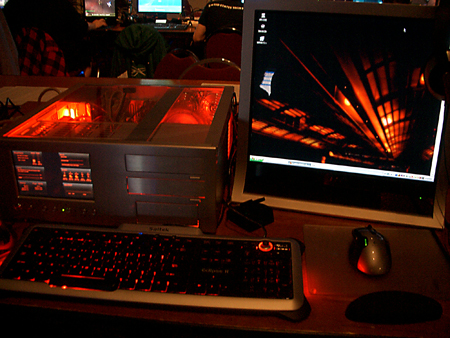
While the overclocking and tuning continues, I did manage to finish the case lights over the weekend. I choose to use white lights so the colors of everything (which have been all nicely coordinated, after all) wouldn’t be washed in any particular color. I got a couple 12″ Logisys LED sticks. They are just like the more common cold cathode tubes, except inside the tube is a very slim circuit board with LEDs mounted to it. It tends to be a little cooler than the CCFL route and more importantly takes 12 volts directory without the need of an inverter module.

The only trouble with these lights is that with 18 white LEDs each(!) they are crazy bright, especially in a darkened room. So I decided I’d create a little screen over each one to tone them down. I found this decorative mesh at Home Depot which had the open to closed ratio I was looking for. I cut off a couple chunks with tin snips and folded it into a U-shape, then painted it red to match the case.

Then I slipped each LED tube into its screen and mounted them to either side of the top of the case with zip ties. I also soldered everything up to the switch and mounted it to the front panel. I’m pleased with the final effect. The light is white so you can see the red and black theme inside nicely, but you don’t feel the need for sunglasses.

Filed under Comp hardware / mods

Computer Build 09: Part 9

For the past couple weeks I’ve been on vacation and then sick, so the box building has certainly slowed down, but I’ve some progress over the past couple days.

First off, I picked up a couple final parts. After doing better in Vegas than I expected, I picked up a 300GB 10k rpm Velociraptor hard drive. I benchmarked it against the 80GB 7200rpm Barracuda drive that I already had installed and the Velociraptor is about twice as fast in every metric. It doesn’t really get that warm either. It’s a pretty awesome drive in a tiny package. I also got my wireless card and installed it. I went with the Linksys WMP300N PCI card – roughly the same as the Belkin wireless N card that I had been using, but a little beefier antenna and a bit cheaper. It took some getting used to the management of wireless networks in Vista, but so far performance is looking great.

And then there’s the continual wiring work that I’ve been doing. Most recently I installed my old 3.5″ device for front panel USB and audio ports. The USB lines got bundled and sheathed. Unfortunately, the audio cable was a few inches too short to make it to my sound card, however. So for that I spliced a piece of outdoor sprinkler wire (it had more than enough conductors at approximately the right gauge). Then I mounted a switch next to the 3.5″ device for controlling the fan speeds on the PSU / HDD side of the case. After a little soldering I can now switch those two 120mm fans between a low setting of 5 volts to a high of 12 volts. One last project will be mounting a second switch to control the case lighting.

Now, about this green circuit board on the network card…hmmm

Filed under Comp hardware / mods

Computer Build 09: Part 8

A quick update after a bunch of work last weekend.

I spent about five hours on Saturday working on the box. I started with putting the mobo tray back in the case before continuing with any wiring. Well, that didn’t go so well. It may not be apparent from the previous pics, but the CPU cooler stands higher than everything else, and as I (un)lucked out, it was about 1/4 inch too tall from making it back into the case. So I had to remove the motherboard and the expansion cards from the tray, insert the tray, and remount everything inside the case. That was a better option in my book than taking off the cooler and cleaning and reapplying fresh thermal compound.

After all that was done I went back to wiring. I shortened the wires of four of the case fans and added new connectors. I also spent quite a while soldering up a couple Y-adpaters which let you connect two fans to a single motherboard header (except only using the rpm wire of one of them). I also sheathed the main front panel wires (power switch, power led, reset switch, HDD led). With all that done, the motherboard side of the case is looking decent; the psu side is still a big mess.

Sunday I decided I needed a break from wiring and started with some other stuff. First I pulled the DVD drive from my old machine to move to the new comp. But the greyish drive enclosure just didn’t look right, so I masked it up and painted the case black. It’s about this time that I realized things had gotten completely silly. Then once the drive was dry I put it in and started….finally…loading the OS. After a couple hours I had 64-bit Vista and the basic drivers installed. After another couple I had a second partition set up, anti-virus loaded, and all the OS and driver updates installed. And don’t be hatin’ on Vista, after all, check out the available RAM :)

Since then I’ve only been loading system apps/utilities. I have to move another hard drive into it before I can load the major stuff, and only after that will I worry about system tweaking and overclocking. Not to mention there’s still a bunch of wiring work left.

Filed under Comp hardware / mods